
Illustrative case study · Simulated fleet
An overdue rental, from the first alert to dock handover
Tern is late. The dock team needs a reliable picture of the trip, a named person handling the follow-up and a clear record for whoever takes over next.
Harborline Charters is fictional. This walkthrough uses the actual PATHR dashboard with simulated boats, readings and outcomes. No customer results are claimed.
By the Pathr Fleet team · · 4 min read
- Operation
- Harborline Charters · Fictional operator
- Vessel
- Tern · 20 ft rental
- Focus
- Rental operations
The situation
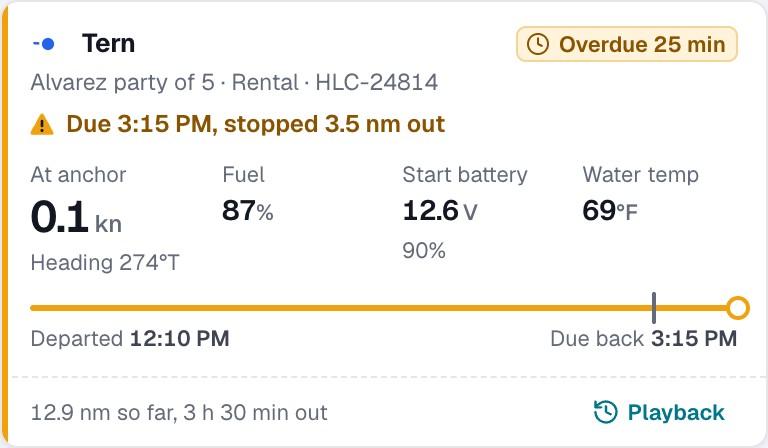
This illustrative case follows Harborline Charters, the fictional operator in the public PATHR Fleet demo on San Diego Bay. Its rental Tern is booked from noon to 3:15 PM. At the default 3:40 PM scene, the boat is still at Glorietta Bay anchorage. All times are San Diego local; the people, bookings and vessel movements are simulated.
The demo applies a configured 10-minute grace period. Tern becomes overdue at 3:25 PM because the rental has passed that allowance and the reported position remains outside its return zone. An overdue state identifies a situation to assess. The map alone cannot establish the occupants’ condition or explain their plans.
The decision
When a late boat appears to be coming home, what still needs to happen before the dock team can close the handover?
Work through the decision
Establish what the dashboard actually knows
Open Tern’s trip and compare the booking’s due-back time, the return zone and the time of the last position fix. Check whether successive reports show movement or whether the displayed point is old. Observation time and upload time describe different things; receiving a record now does not make its position current.
Keep an alert acknowledgment separate from the investigation. Acknowledging the warning records that someone saw it. It does not establish contact, refresh the GPS fix or return the boat.
Give contact and follow-up their own record
Use the trip log to record who attempted contact, when, whether someone answered and what that person reported. Assign the next action and update time. A no-answer entry and a successful conversation must remain distinguishable, and a later correction should preserve the original observation.
The matching guided lesson lets a visitor record a fictional renter conversation. Nothing calls a real customer. That practice exercise uses its own Friday training fleet, separate from the public demo and the timed Saturday challenge.
Follow the return through to the dock
Watch the position reports as the simulated trip continues. On the unchanged demo timeline, Tern heads back at 3:52 PM, reaches the return zone at 4:16 PM and ties up at 4:23 PM. The zone arrival clears the overdue alert before the physical dock arrival.
Keep the return inspection and handover as explicit tasks. Any later booking needs its own readiness check: fuel, equipment, reported defects, staffing and turnaround. Changing a scheduled time cannot complete those tasks or prove that a boat has returned.
What this example demonstrates
The demonstrated result is a sequence of visible states: overdue, returning, inside the return zone and finally alongside. A trip note can preserve the team’s assessment beside those observations, so the next shift can distinguish what the sensors reported from what staff established through contact.
The unedited demo follows a predetermined return. Logging a call does not cause that return, and these timings are not a solution key for Survive Saturday, which changes the operating conditions and decisions.
What to measure in a real pilot
Use this example to frame an evaluation with your team. A real pilot needs your boats, equipment, connectivity and operating procedure before any operational benefit can be measured.
- Compare configured overdue and return-zone events with independently recorded dock times, including reporting gaps.
- Record time to first review and contact outcome, then check whether the next shift can identify the owner and next action.
- Track delayed departures and their documented causes before comparing complete, comparable operating periods.
Read the current product and hardware status before planning a rollout.
Want to evaluate this workflow with your fleet?