For charter operators
Charter fleet management with routes your captains accept.
Plan each charter's route on the Pathr nautical chart, send it to the captain, and follow the trip from the office: how far along it is, the ETA, and whether the boat is on its route. Engine hours, fuel and alerts come from the boat itself.
The demo runs a simulated fleet in your browser. No account needed.

Plan the route on a real chart
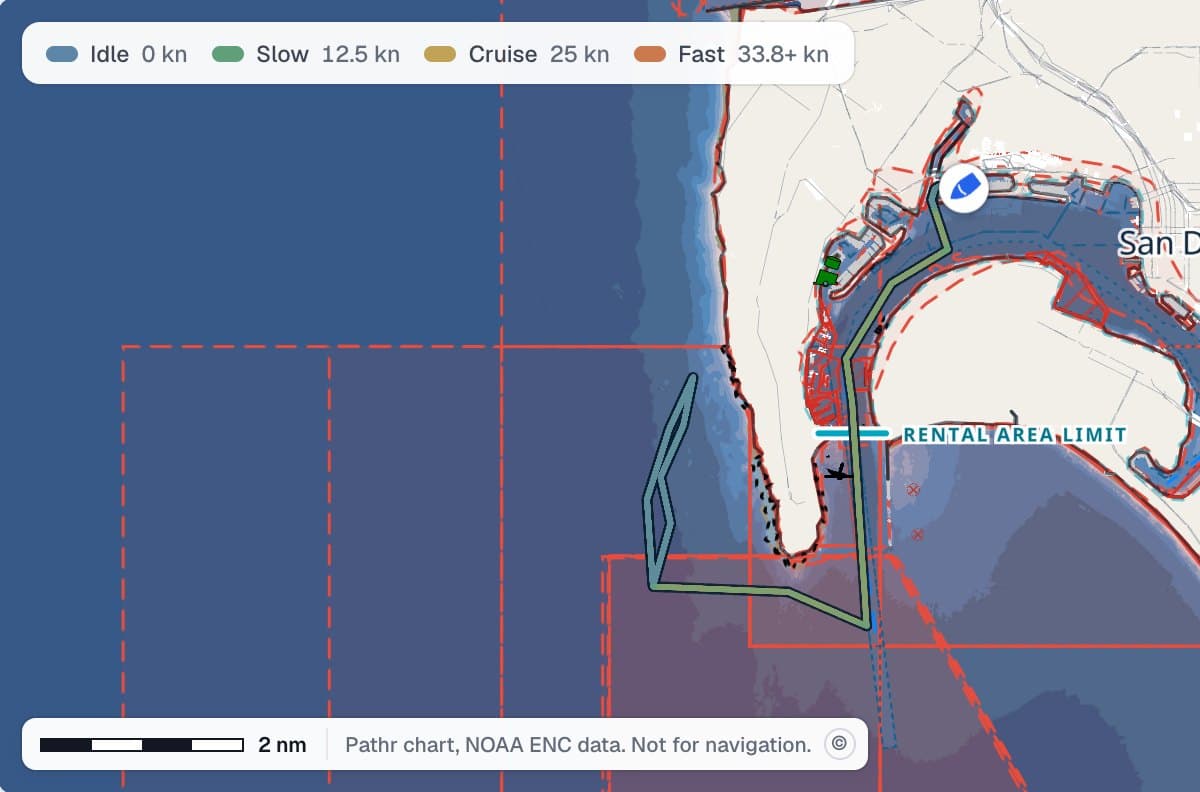
Pick the boat, the captain and the booking, then draw the route or let Pathr routing draw it. Every leg is checked for that boat before it can be sent.
- Land and piers
- Charted depth against the boat's draft, with a margin
- Bridge clearance against its air draft
- Charted no-entry zones
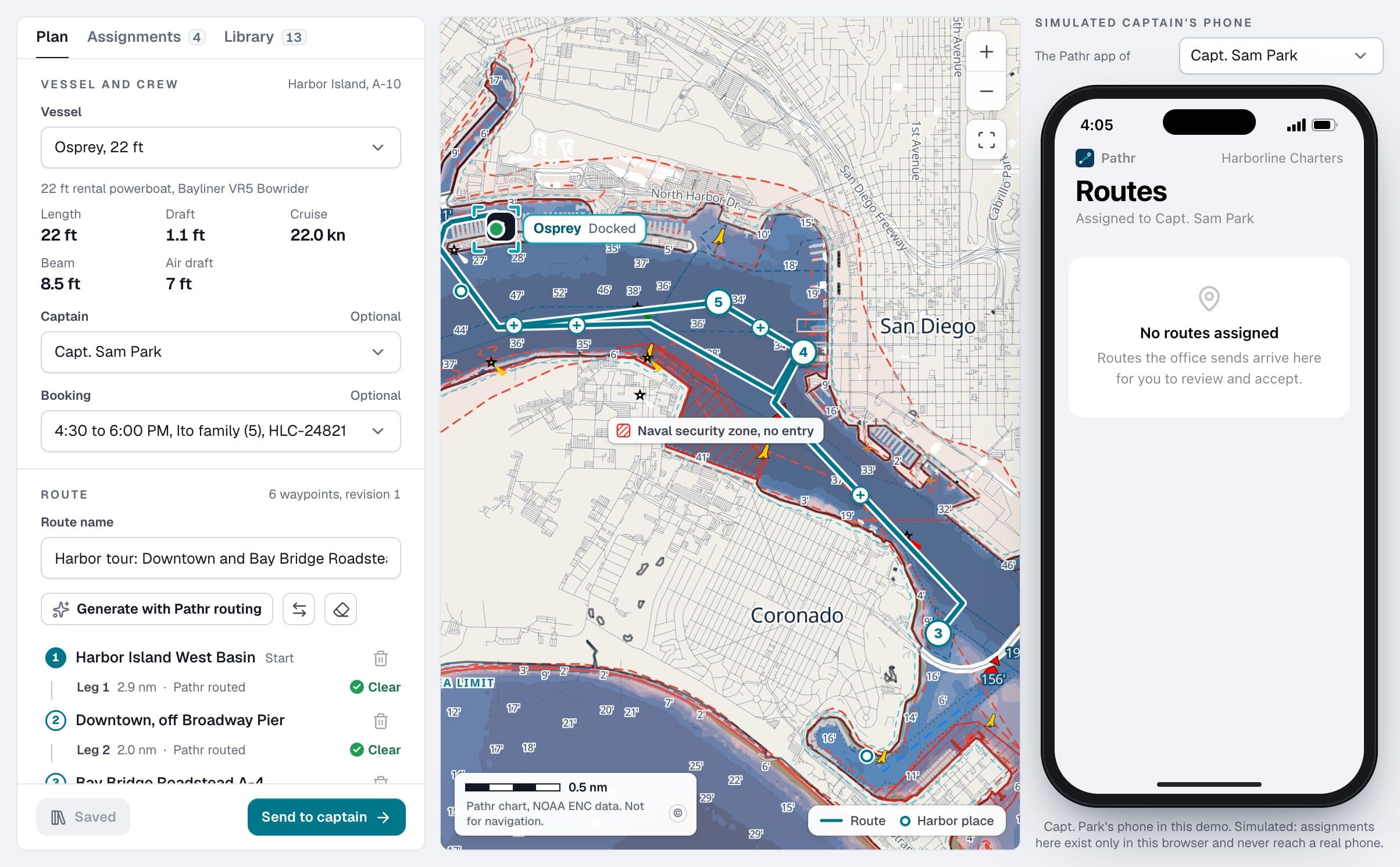
The captain reviews and accepts
The route arrives in the captain's Pathr app with the charter, the distance, the duration and the safety notes. Navigation starts only after the captain accepts it, and dispatch never steers a boat or touches the autopilot.
In the demo today the captain's side runs on a simulated phone. The captain's screen comes to the Pathr app for pilot fleets.
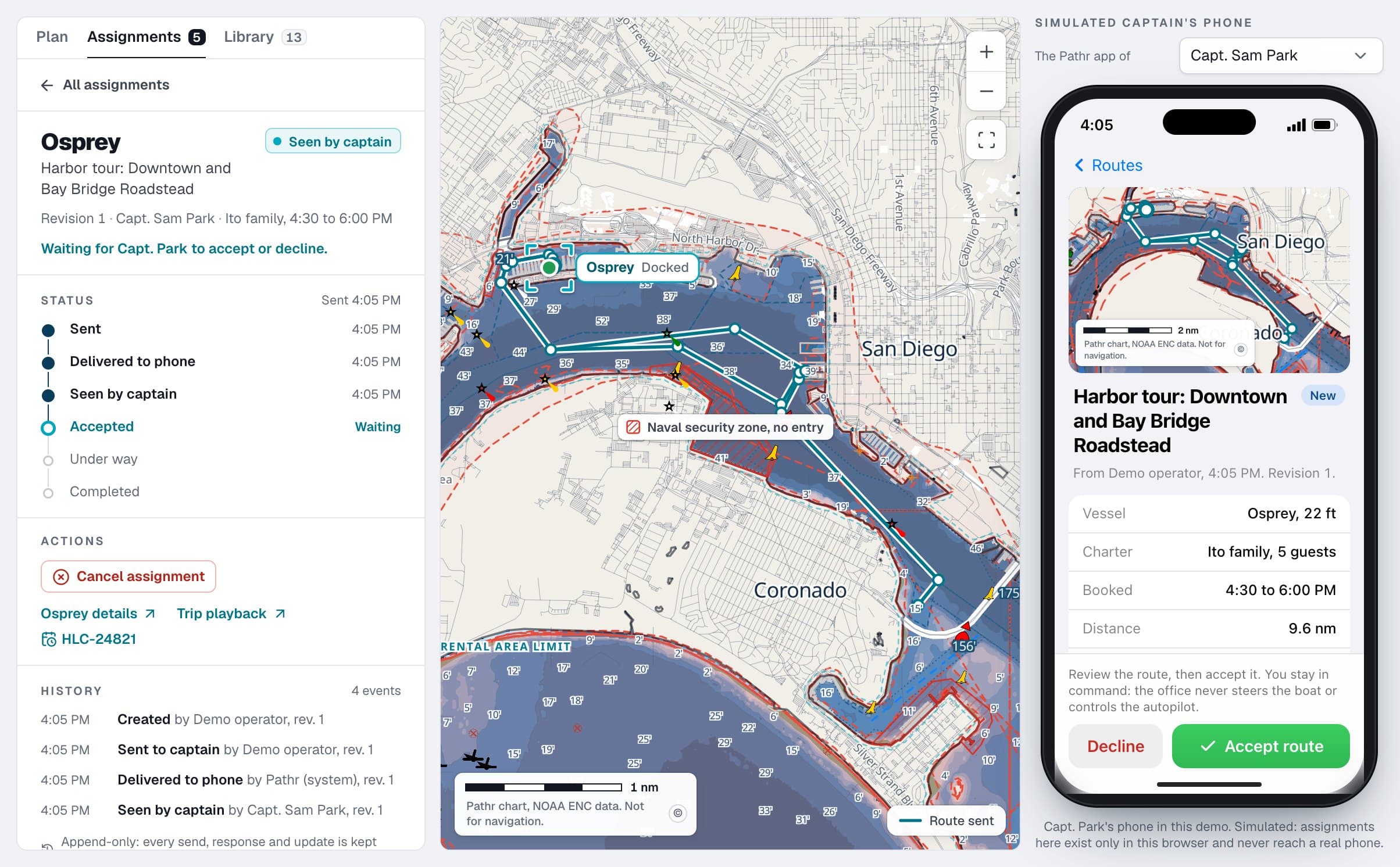
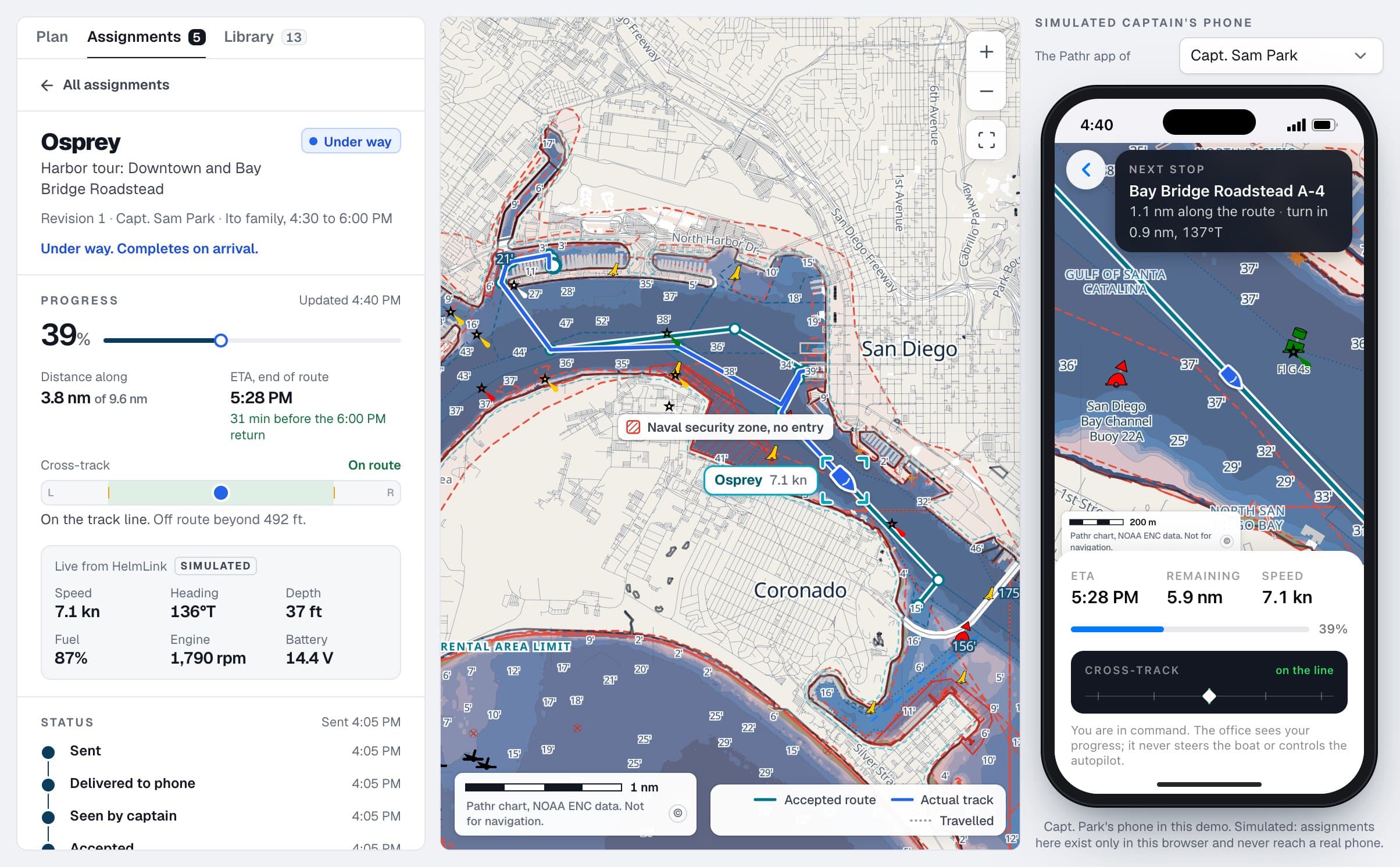
Progress, ETA and route changes
While the boat is under way the office sees how far along the route it is and an ETA from the route's plan, so a boat trolling or anchored for lunch is not shown hours late. If it strays more than 150 meters from the route, the office gets an off-route warning, and it clears when the boat is back on the line.
Need to change the plan? Send an update. The accepted route stays in force until the captain accepts the new one.
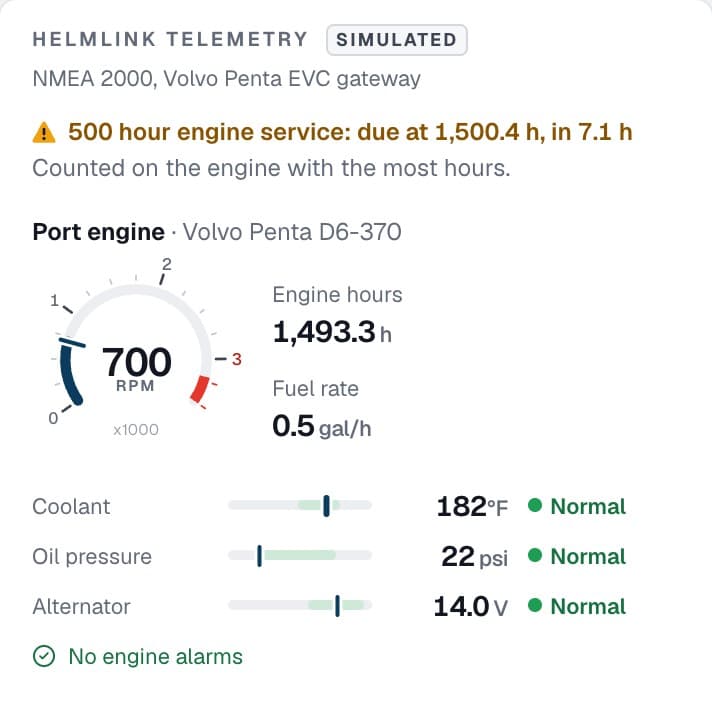
Engines and maintenance from the boat itself
Twin engines report hours, RPM, coolant, oil pressure and fuel rate. Service intervals count down from the engine's own hours, and an open issue keeps the boat off the schedule until it is fixed.
Every charter on the record
Each trip keeps the planned route and the track it actually sailed, with speed, engine and every alert, for the debrief or the customer who asks.
Questions operators ask
- Is the captain app available today?
- The office side of route dispatch works in the interactive demo, with the captain's side on a simulated phone. The captain's screen comes to the Pathr app for pilot fleets.
- Does dispatch control the boat or the autopilot?
- No. A dispatched route is a plan for the captain to review, not an order to the boat. The captain accepts it, starts navigation, and stays in command throughout.
- What does the route check look at?
- Every leg is checked for the boat it is sent to: land and piers, charted depth against its draft with a margin, bridge clearance against its air draft, and charted no-entry zones. A leg that crosses land or a pier cannot be sent; other cautions go to the captain with the route.
- Can we reuse routes?
- Yes. Routes are saved to a library with revisions. Changing a saved route never changes one already sent to a captain.
- What goes on the boat?
- A HelmLink unit on the boat's NMEA 2000 network, the same network the chartplotter and engine gauges already use. It reads the position, engine, fuel and battery data that is already there. Pilot units ship with a cellular modem.
- What happens when a boat loses cell signal?
- The unit keeps recording and fills the gap when it reconnects. Every reading shows its age, so a boat out of signal reads as out of signal, not as stopped.
- How do we try it?
- With the 60-day Pathr Fleet Pilot: up to five of your boats, HelmLink hardware with cellular, the fleet dashboard and onboarding, including drawing your operating areas and return zones with your team. Pricing is discussed on the call.
Pathr Fleet for other operators
The pilot
60-day Pathr Fleet Pilot
Up to five of your boats on Pathr Fleet for 60 days, with HelmLink hardware, cellular tracking, the fleet dashboard and onboarding.
Pricing is discussed on the call.
How it starts
- We reply by email to set up a short call.
- We look at your boats and their NMEA 2000 networks together.
- If it is a fit, we plan your 60-day Pathr Fleet Pilot: HelmLink units on up to five boats, with your operating areas and return zones set up with you.
Open to a small number of charter and rental operators.
What the pilot includes
Up to five vessels
Start with the boats you most want to keep an eye on: rentals, charters or both.
HelmLink hardware
A unit on each boat, on the NMEA 2000 network already aboard. Pilot units ship with a cellular modem.
Cellular tracking
Positions and readings while boats are under way, not only when they are back at the dock.
Fleet dashboard access
The chart, alerts, trips and bookings, maintenance, routes and reports for your team.
Onboarding
Operating areas and return zones drawn with your team, and a walkthrough for your staff.