Plan the next service
Review tasks due by engine hours, calendar time or both. Use the relevant vessel and manufacturer schedule rather than a generic interval.

Boat maintenance software
A routine service approaching its interval is a different job from a boat waiting on a repair. PATHR Fleet brings the schedule, reported issues, completed work and vessel availability into the same maintenance workspace.
Explore the actual dashboard with a simulated fleet. No account needed.
Review tasks due by engine hours, calendar time or both. Use the relevant vessel and manufacturer schedule rather than a generic interval.
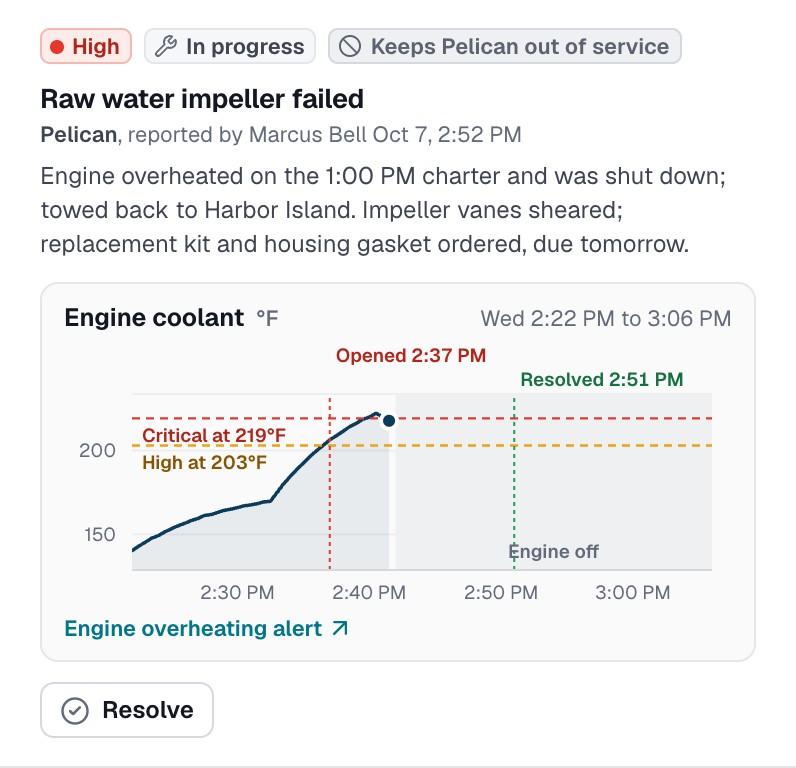
Keep the reported observation, assessment, work status and supporting notes distinct from a completed repair.
Use an explicit staff hold when required. Review outstanding work and release conditions before returning a vessel to service.
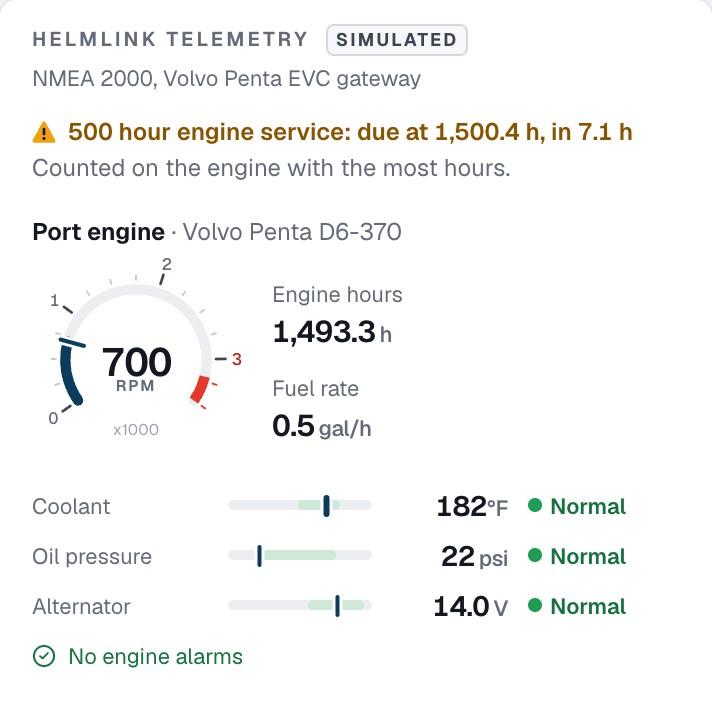
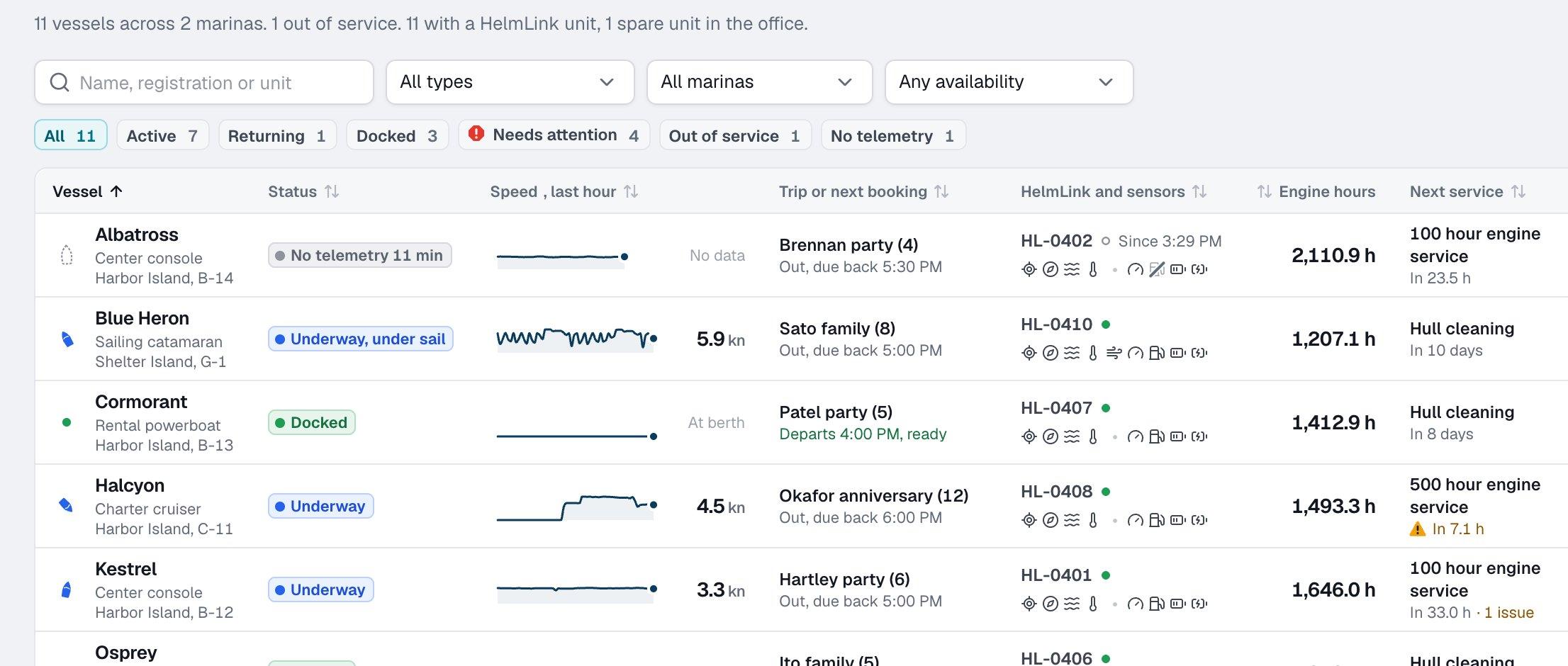
Halcyon’s afternoon demo shows roughly seven engine hours remaining before its configured service is due. That is a planning allowance, not a declaration that the boat has failed. The task can also have a calendar limit, with the earlier due condition needing attention.
When compatible instruments provide engine hours, HelmLink can bring that reading into the workflow. Where hours are unavailable, an hour-based countdown cannot be evaluated; a calendar schedule and documented readings need their own process. A connected network alone does not guarantee that every engine reports hours.
A booked boat still needs a readiness decision. The fleet view puts vessel status, its current or next booking, available readings and service allowance together, so staff can investigate before check-out.
An unresolved issue, planned downtime and a manual hold are separate controls. Not every open issue automatically grounds a vessel. Staff decides when a hold is required, records the work actually performed and reviews the release conditions before changing availability. An inspection-generated maintenance issue retains its source evidence without assigning that release decision to AI.
From the screen to your operation
Check each task’s interval, last completed service and available meter reading. Confirm the schedule against the requirements for that boat and engine.
Create an issue with the observation, severity and follow-up. Keep a diagnosis, parts estimate and completed work distinguishable.
Choose any required hold or planned downtime and communicate the owner and release conditions before the next departure.
Retain the date, meter reading and technician’s record. Review remaining issues before an authorized person returns the boat to service.
Before you decide
What you can explore now, where the limits are, and what to discuss with the PATHR team.
The public maintenance workspace is an interactive simulated demo. Live Fleet access is planned, and a pilot must agree the supported workflows, connectivity and any development needed. The demonstration is not evidence of a deployed customer maintenance system.
HelmLink currently reads available data from NMEA 2000 equipment. Automatic hours depend on the engine, gateway and network actually publishing them. Field units upload over Wi-Fi today; cellular-equipped pilot units are planned. A missing reading remains unavailable rather than being estimated as a measured value.
Yes in the working demo. Tasks can use calendar intervals, engine-hour intervals or both, as well as a specific due point. A task becomes due when an applicable limit is reached. Without a reported engine-hours value, the hour-based limit cannot be evaluated.
No. An issue can carry an explicit out-of-service decision, and staff can apply a manual hold or planned downtime. Inspection-generated maintenance does not automatically ground a boat. The responsible team must decide the appropriate operational restriction and release requirements.
No such outcome is established. The demonstrated workflow organizes readings, service plans, issues and work records. It supports staff decisions but does not prove that a boat is fit to depart, replace required inspections or establish predictive-maintenance accuracy.
Keep the whole workflow connected
Review HelmLink, current NMEA 2000 support and the equipment checks for a pilot.
Keep a confirmed condition finding linked to the boat and its work record.
Understand the difference between an engine meter, a service interval and remaining allowance.
Illustrative case study · Simulated fleet. Compare Pelican’s hold with Halcyon’s approaching service.
A closer look at your operation
Bring the situations your team handles every day. We’ll walk through the dashboard around those workflows and map the equipment, connectivity and setup for your fleet.
We confirm scope, availability and pricing with you.
How it starts
Bring PATHR to your fleet with a setup planned around your boats, equipment and team.
What we review together
Your operating day
Focus the walkthrough on your boats, handovers and the work that slows your team down.
Equipment compatibility
NMEA 2000 is supported today. Bring your equipment list so we can confirm the connections and readings available for each boat. Additional systems are reviewed individually.
Connectivity review
Field units upload over Wi-Fi today. Cellular-equipped units are planned; we agree coverage and reporting expectations for your operation.
Dashboard workflows
Explore the chart, alerts, manually entered bookings, maintenance and dispatch. The public dashboard uses simulated data; we confirm the workflows available for your deployment.
A practical rollout plan
Agree the boats, supported workflows, equipment and onboarding for your rollout. We plan timing and pricing with you so your team knows how to get started.